
Stack:- 20.Valid Parentheses | 1598. Crawler Log Folder | 232. Implement Queue using Stacks

 Valid Parentheses

Given a string s containing just the characters '('')''{''}''[' and ']', determine if the input string is valid.

An input string is valid if:

  1. Open brackets must be closed by the same type of brackets.
  2. Open brackets must be closed in the correct order.
  3. Every close bracket has a corresponding open bracket of the same type.

Example 1:

Input: s = "()"

Output: true

Example 2:

Input: s = "()[]{}"

Output: true

Example 3:

Input: s = "(]"

Output: false

Example 4:

Input: s = "([])"

Output: true

Example 5:

Input: s = "([)]"

Output: false

Constraints:

  • 1 <= s.length <= 104
  • s consists of parentheses only '()[]{}'.

Solution:

class Solution:
def isValid(self, s: str) -> bool:
stack=[]
valid={")":"(","}":"{", "]":"["}

for c in s:
if c in valid:# values are looked up not key so opening
if stack and stack[-1]==valid[c]:
stack.pop()
else:
return False
else:
stack.append(c) # closing brackets appended
return True if not stack else False


Easy
Topics
premium lock iconCompanies
Hint

The Leetcode file system keeps a log each time some user performs a change folder operation.

The operations are described below:

  • "../" : Move to the parent folder of the current folder. (If you are already in the main folder, remain in the same folder).
  • "./" : Remain in the same folder.
  • "x/" : Move to the child folder named x (This folder is guaranteed to always exist).

You are given a list of strings logs where logs[i] is the operation performed by the user at the ith step.

The file system starts in the main folder, then the operations in logs are performed.

Return the minimum number of operations needed to go back to the main folder after the change folder operations.


Example 1:

Input: logs = ["d1/","d2/","../","d21/","./"]
Output: 2
Explanation: Use this change folder operation "../" 2 times and go back to the main folder.

Example 2:
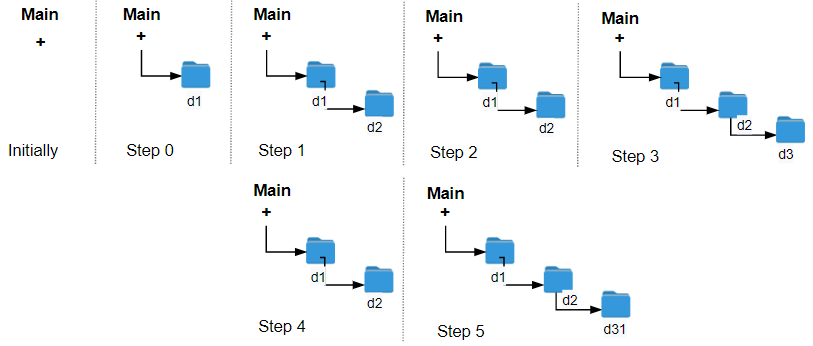
Input: logs = ["d1/","d2/","./","d3/","../","d31/"]
Output: 3

Example 3:

Input: logs = ["d1/","../","../","../"]
Output: 0


Constraints:

  • 1 <= logs.length <= 103
  • 2 <= logs[i].length <= 10
  • logs[i] contains lowercase English letters, digits, '.', and '/'.
  • logs[i] follows the format described in the statement.
  • Folder names consist of lowercase English letters and digits.

Solution:

class Solution:
def minOperations(self, logs: List[str]) -> int:
stack=[]

for i in logs:
if i == "../":
if stack:
stack.pop()
elif i =="./":
pass
else: stack.append(i)
count= len(stack)
return count

OR----------------------

class Solution:
def minOperations(self, logs: List[str]) -> int:
stack=[]

for i in logs:
if i == "../":
if stack:
stack.pop()
elif i !="./": stack.append(i)
count= len(stack)
return count

 232. Implement Queue using Stacks

Easy

Implement a first in first out (FIFO) queue using only two stacks. The implemented queue should support all the functions of a normal queue (pushpeekpop, and empty).

Implement the MyQueue class:

  • void push(int x) Pushes element x to the back of the queue.
  • int pop() Removes the element from the front of the queue and returns it.
  • int peek() Returns the element at the front of the queue.
  • boolean empty() Returns true if the queue is empty, false otherwise.

Notes:

  • You must use only standard operations of a stack, which means only push to toppeek/pop from topsize, and is empty operations are valid.
  • Depending on your language, the stack may not be supported natively. You may simulate a stack using a list or deque (double-ended queue) as long as you use only a stack's standard operations.

Example 1:

Input
["MyQueue", "push", "push", "peek", "pop", "empty"]
[[], [1], [2], [], [], []]
Output
[null, null, null, 1, 1, false]

Explanation
MyQueue myQueue = new MyQueue();
myQueue.push(1); // queue is: [1]
myQueue.push(2); // queue is: [1, 2] (leftmost is front of the queue)
myQueue.peek(); // return 1
myQueue.pop(); // return 1, queue is [2]
myQueue.empty(); // return false 

Constraints:

  • 1 <= x <= 9
  • At most 100 calls will be made to pushpoppeek, and empty.
  • All the calls to pop and peek are valid.

Follow-up: Can you implement the queue such that each operation is amortized O(1) time complexity? In other words, performing n operations will take overall O(n) time even if one of those operations may take longer.

Solution:


When you pop from S1 add to S2 so the order of queue is maintained.
class MyQueue:

def __init__(self):
self.s1=[]
self.s2=[]

def push(self, x: int) -> None:
self.s1.append(x)

def pop(self) -> int:
if not self.s2:
while self.s1:
self.s2.append(self.s1.pop())
return self.s2.pop()

def peek(self) -> int:
if not self.s2:
while self.s1:
self.s2.append(self.s1.pop())
return self.s2[-1]

def empty(self) -> bool:
return max(len(self.s1),len(self.s2))==0


# Your MyQueue object will be instantiated and called as such:
# obj = MyQueue()
# obj.push(x)
# param_2 = obj.pop()
# param_3 = obj.peek()
# param_4 = obj.empty()
You can absolutely use a custom name like haha instead of self.
In Python, self is not a reserved keyword; 
class MyQueue:
    def __init__(sura):
        haha.s1 = []
        haha.s2 = []
self isn't a method—it's a reference to the specific object you just created.
Think of a class like a blueprint for a house. self is the address of the specific house you are currently standing in. A class is just a template. If you create two different queues, q1 and q2, the computer needs to know which one you're talking to. When you call q1.push(5).
Inside __init__, if you write s1 = [], that variable is "temporary memory." It dies when the function ends.

If you write self.s1 = [], you are telling Python: "Store this list inside this specific object forever."


Check out my Cyber Security Youtube channel: zodiac


Comments

Popular posts from this blog

Bug Boundy Methodology, Tools & Resources

Start by defining a clear objective, such as exploiting a remote code execution (RCE) vulnerability or bypassing authentication on your target. Then, consider how you can achieve this goal using various attack vectors like XSS, SSRF, or others - these are simply tools to help you reach your objective. Use the target as how a normal user would, while browsing keep these questions in mind: 1)How does the app pass data? 2)How/where does the app talk about users? 3)Does the app have multi-tenancy or user levels? 4)Does the app have a unique threat model? 5)Has there been past security research & vulnerabilities? 6)How does the app handle XSS, CSRF, and code injection?

API Bug Bounty Hunting: Reconnaissance and Reverse Engineering an API

  In order to target APIs, you must first be able to find them.APIs meant for consumer use are meant to be easily discovered. Typically, the API provider will market their API to developers who want to be consumers. So, it will often be very easy to find APIs, just by using a web application as an end-user. The goal here is to find APIs to attack and this can be accomplished by discovering the API itself or the API documentation. Bug Boundy Methodology, Tools & Resources Start by defining a clear objective, such as exploiting a remote code execution (RCE) vulnerability or bypassing… adithyakrishnav.blogspot.com Reconnaissance Passive Reconnaissance It is obtaining information about a target without directly interacting with the target’s systems. Google Dorking Firstly, google search for “<app name> API”. intitle:” api” site:”google.com” inurl:”/api/v2" site:”google.com” inurl:”/api/v1" intext:”index of /” inurl:json site:”google.com” intitle:”index.of” intext:”api.t...

Install & set up mitmweb or mitmproxy in Linux

Step 1: Go to the mitmproxy page and download the binaries. Step 2: Install the downloaded tar file with the command " tar -xzf <filename>.tar.gz " Step 3: In the FoxyProxy add the proxy 127.0.0.1:8080  and turn it on. Step 4 : In the terminal run command " ./mitmweb " Step 5: Go to the page  http://mitm.it/   and download the mitmproxy's Certificate. Step 6: If you downloaded the certificate for Firefox, then go to " settings -> Privacy & Security -> Click View Certificates -> Click  Import ", then import the certificate.  Step 7: Now you are ready to capture the web traffic. Step 8 : In terminal run " ./mitmweb"